Introducing the T3 Search Engine: All of Metrc in One API Call
Plain-text search across every Metrc endpoint and multiple licenses at once. Start from a partial tag, a manifest number or a strain name and find exactly what you're looking for.
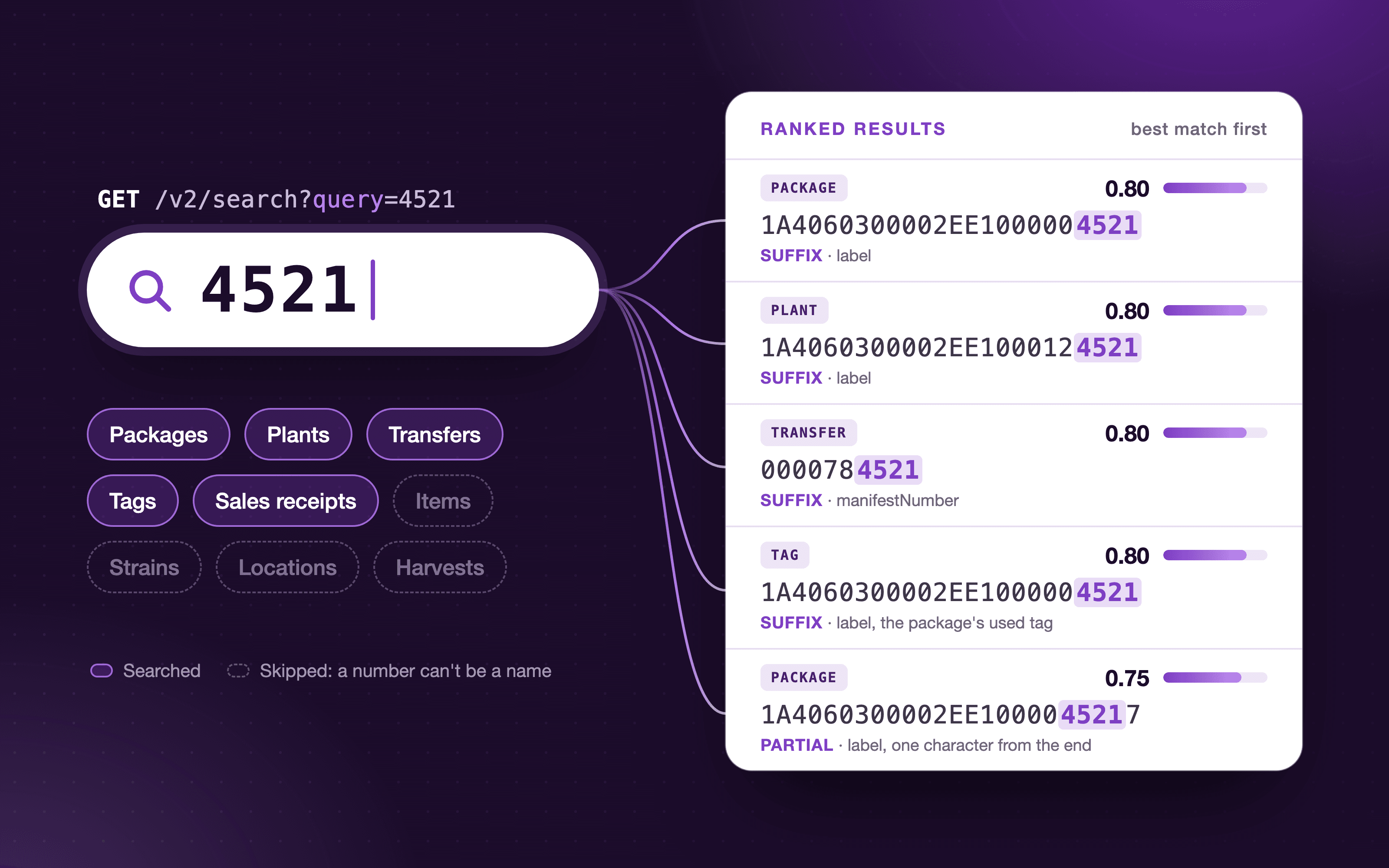
A partial tag written on a bin. A manifest number in an email. A strain name from a customer call. Each one points to a record in Metrc, but Metrc keeps packages, plants, transfers, tags, sales and items in separate lists, and a single package can be active, in transit, on hold, inactive or transferred. Before you can find it, you have to know where to look.
The T3 Search Engine skips that step. It’s built into the T3 API at /v2/search: send whatever you have, and one request checks every place it could be and returns a single list, best match first.
Search with whatever you have
Here is a search for 4521, the last four digits on a tag. Swap in your secret key and license number:
curl "https://api.trackandtrace.tools/v2/search?licenseNumber=LIC-00001&query=4521" \
  -H "X-T3-API-Key: $T3_API_KEY"
Back comes one list with packages, plants, transfers and tags side by side, best match first. Here is the top result:
{
  "data": [
    {
      "objectType": "PACKAGE",1
      "licenseNumber": "LIC-00001",2
      "matchedEntry": {3
        "id": 8812041,
        "label": "1A4060300002EE1000004521",
        "item": { "name": "Blue Dream Bulk Flower", "strainName": "Blue Dream" },
        "quantity": 1814.37,
        "unitOfMeasureAbbreviation": "g",
        "locationName": "Vault"
      }
    },
    …
  ]
}
objectTypeis the kind of record. A package is aPACKAGEwhether it is active, on hold or already transferred, so grouping results takes one line.licenseNumberis the license the record belongs to.matchedEntryis the Metrc record itself, ready to use. There’s no second lookup.
See the response shape for every field.
Find a package from a partial tag
The last few digits of a tag are what people write on bins and read out over the phone. Send them as the query, and every package, plant and tag whose label ends in them comes back, along with any transfer whose manifest number does. A full label works too.
To keep only the packages, filter on objectType:
data = response.json()["data"]

packages = [m["matchedEntry"] for m in data if m["objectType"] == "PACKAGE"]
for package in packages:
    print(package["label"], package["item"]["name"], package["quantity"])
Each package arrives with its item, quantity and location, so the answer to “what is in this bin?” is already in hand.
Look up a manifest or receipt
A manifest number from an email or a receipt number from a customer complaint goes in the same query parameter. There is no separate transfer or sales search to call. Numbers are checked against manifests and receipts as well as tags.
# Current transfers and sales receipts, the default
/v2/search?licenseNumber=LIC-00001&query=0000784521

# Include inactive transfers and past sales too
/v2/search?licenseNumber=LIC-00001&query=0000784521&tiers=1,2,3
Older manifests sit in Metrc’s inactive transfer lists, which the default search leaves out. Add tiers=1,2,3 to include them.
Find a strain across every license
Words search names: items, strains, locations, plant batches and harvests. If you manage more than one license, repeat licenseNumber to search them all in one request. Every result says which license it came from.
import os

import requests

response = requests.get(
    "https://api.trackandtrace.tools/v2/search",
    params={
        "licenseNumber": ["LIC-00001", "LIC-00002", "LIC-00003"],
        "query": "Blue Dream",
    },
    headers={"X-T3-API-Key": os.environ["T3_API_KEY"]},
)
response.raise_for_status()

for match in response.json()["data"]:
    print(match["licenseNumber"], match["objectType"], match["matchedEntry"]["id"])
See searching several licenses for how many licenses fit in one request.
Build a search box that keeps up
Some Metrc collections answer in a fraction of a second, others take a few seconds. In a search box, waiting on the slowest one feels slow. Add stream=true and results arrive the moment each collection answers, so the first matches can be on screen before the rest are done.
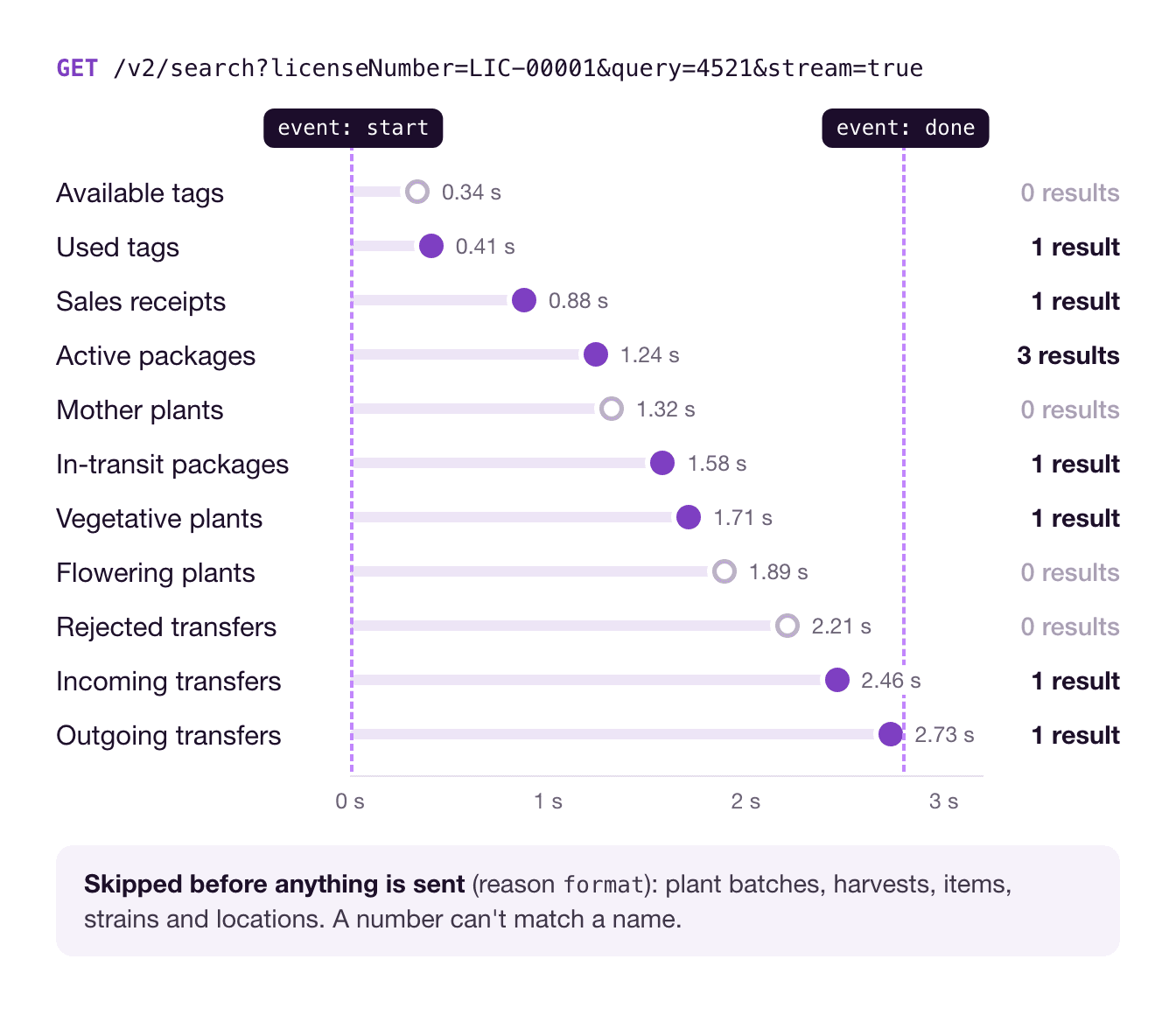
curl -N "https://api.trackandtrace.tools/v2/search?licenseNumber=LIC-00001&query=4521&stream=true" \
  -H "X-T3-API-Key: $T3_API_KEY"
See streaming responses for browser and EventSource examples.
What it searches
A default search covers 16 collections: the active packages, plants, transfers, tags, items, strains and locations that most lookups need. Add tiers=1,2,3 to also search on-hold, inactive and historical records, 39 collections in all.
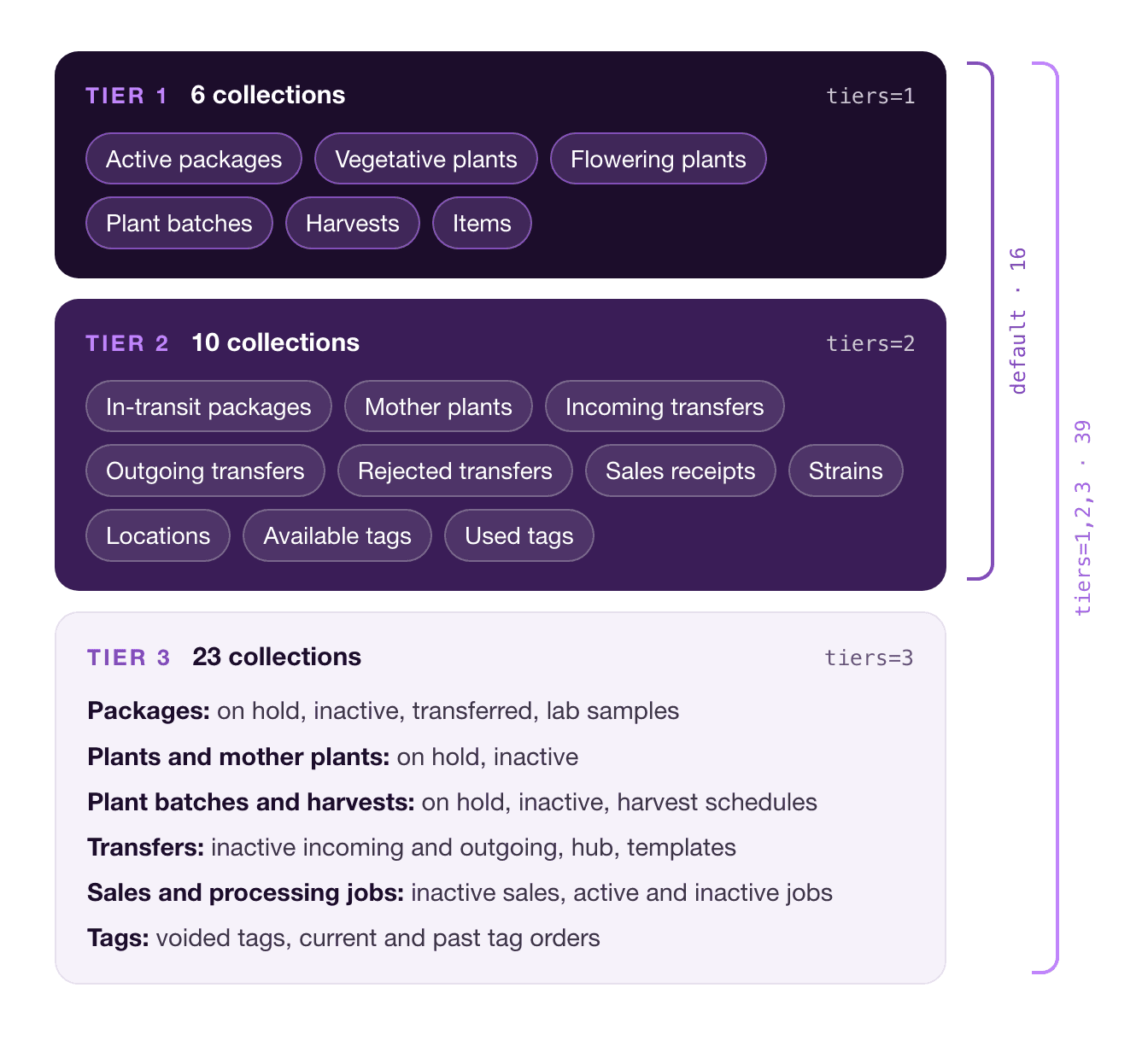
The endpoint catalog lists every collection, and choosing what to search shows how to narrow a search to just the ones you need.
Start searching
- Sign up on the T3 dashboard.
- Generate a secret key and store it as
T3_API_KEY. - Send
/v2/searcha tag, a manifest number or a name.
Found the record you were after? Load it by id with loading one record by ID, or try every endpoint in the interactive API docs.
Full reference: Search on the wiki, and the T3 API overview.